mag_stacker
MagStacker
MagStacker is a self-hosted web app for keeping track of firearms, magazines, ammo, and aftermarket accessories: what you own, which mags fit which guns, which accessories fit which hosts, and what it’s all worth. It’s built for individual owners, clubs, and ranges that don’t want their inventory living in a spreadsheet or somebody else’s cloud.
You run it on your own server, behind your own login, and the data stays with you.
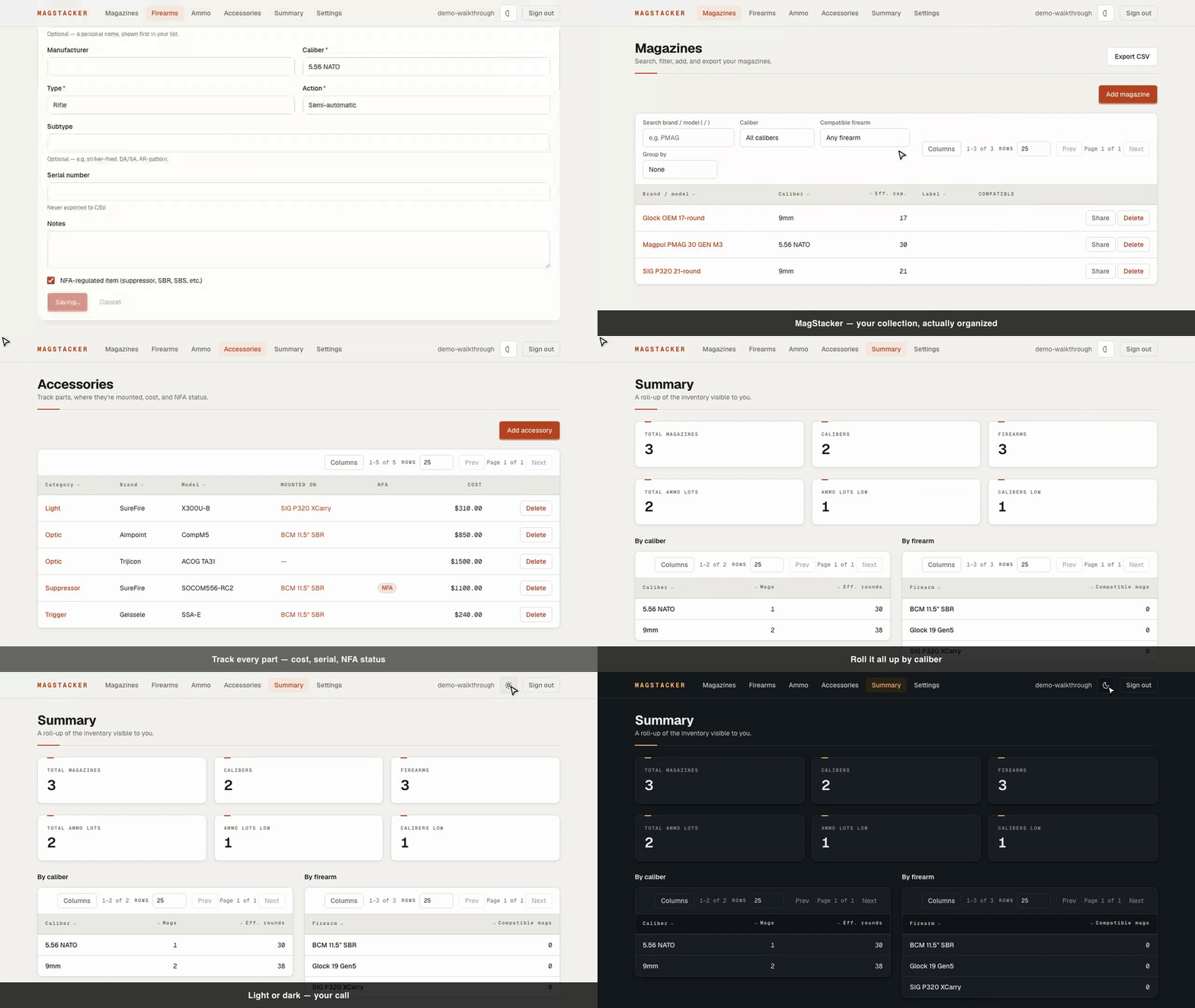
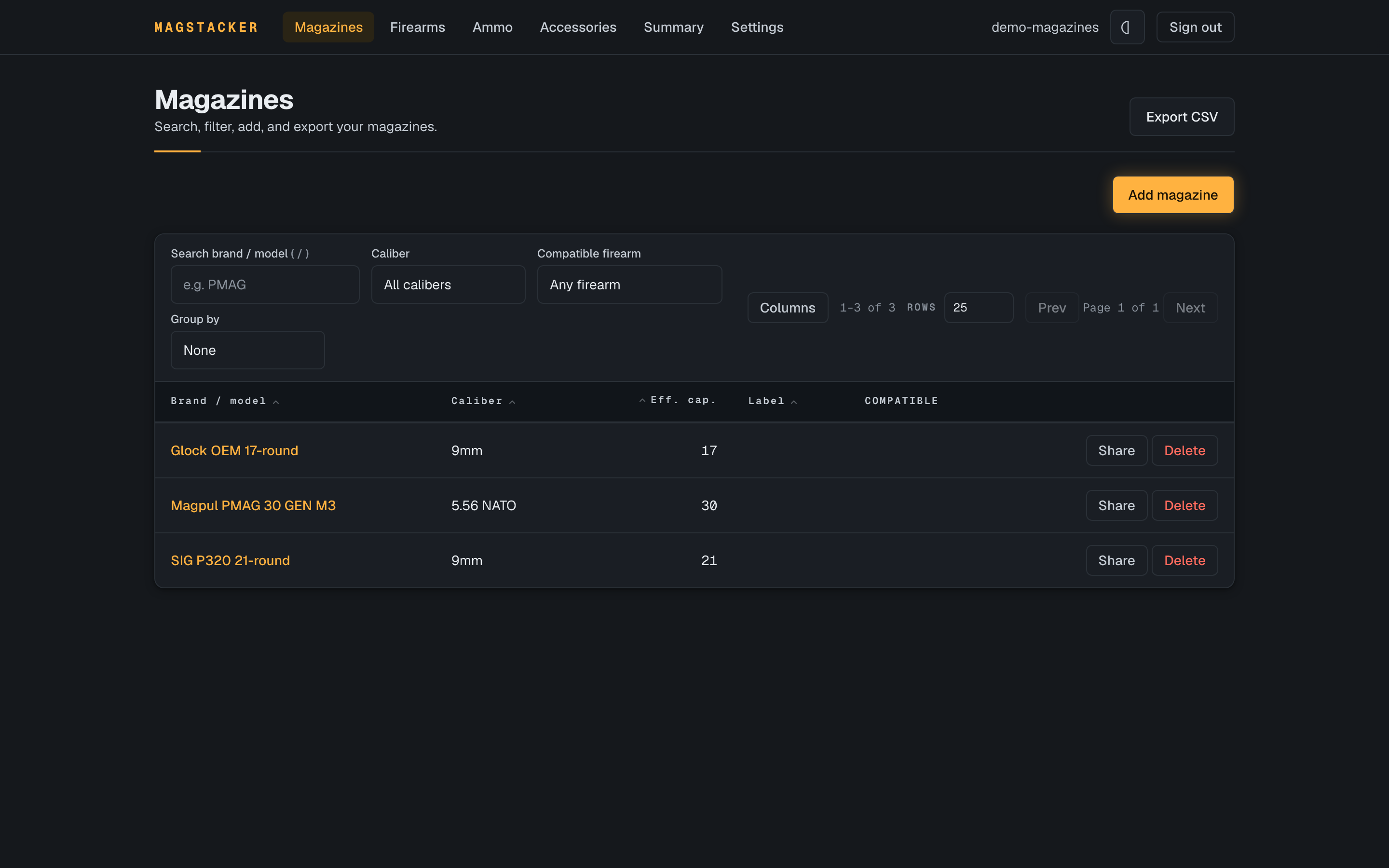
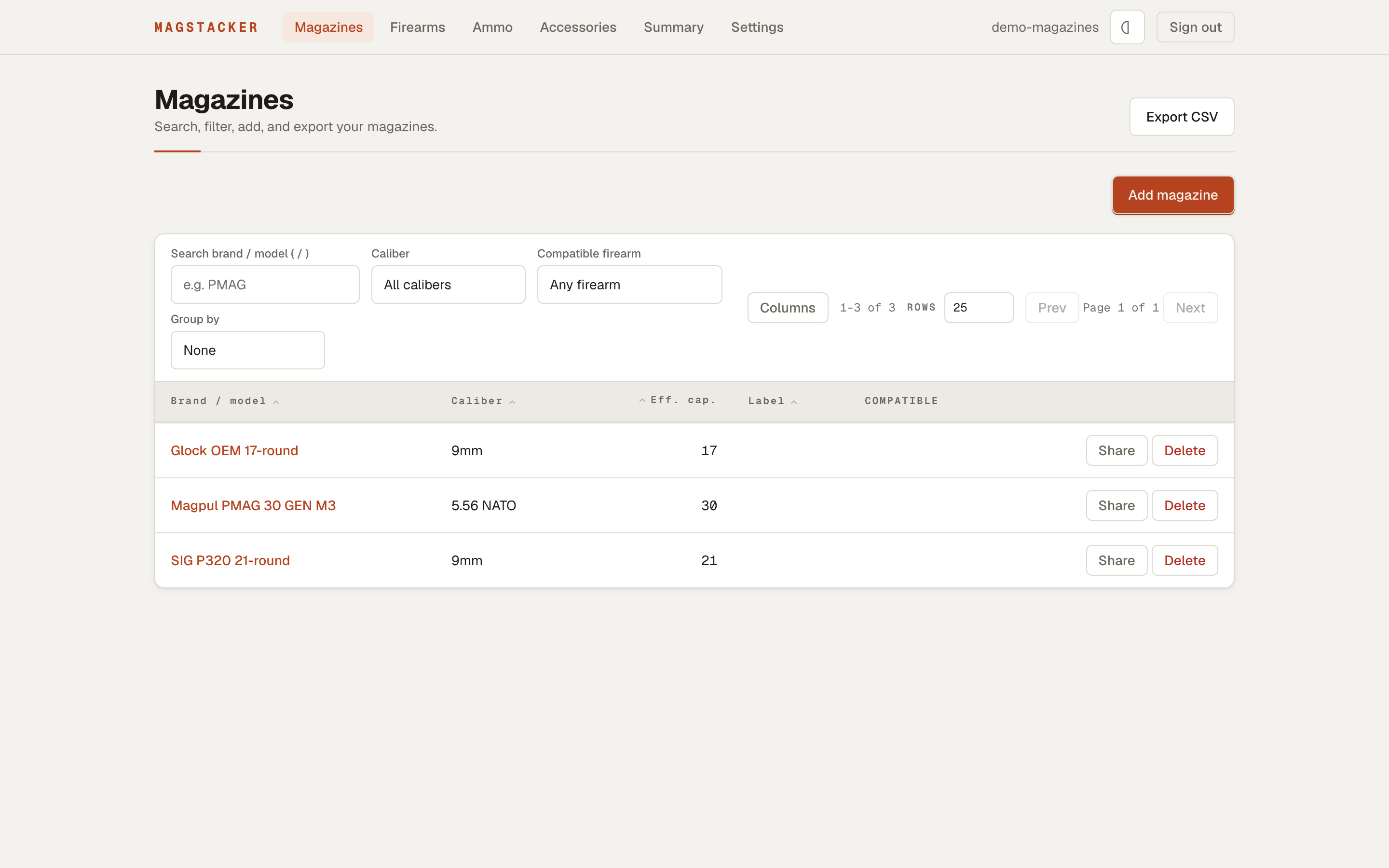
There are two themes, a dark “Field Console” and a light “Machined Instrument”, and the app follows your system setting by default:
| Dark | Light |
|---|---|
 |
 |
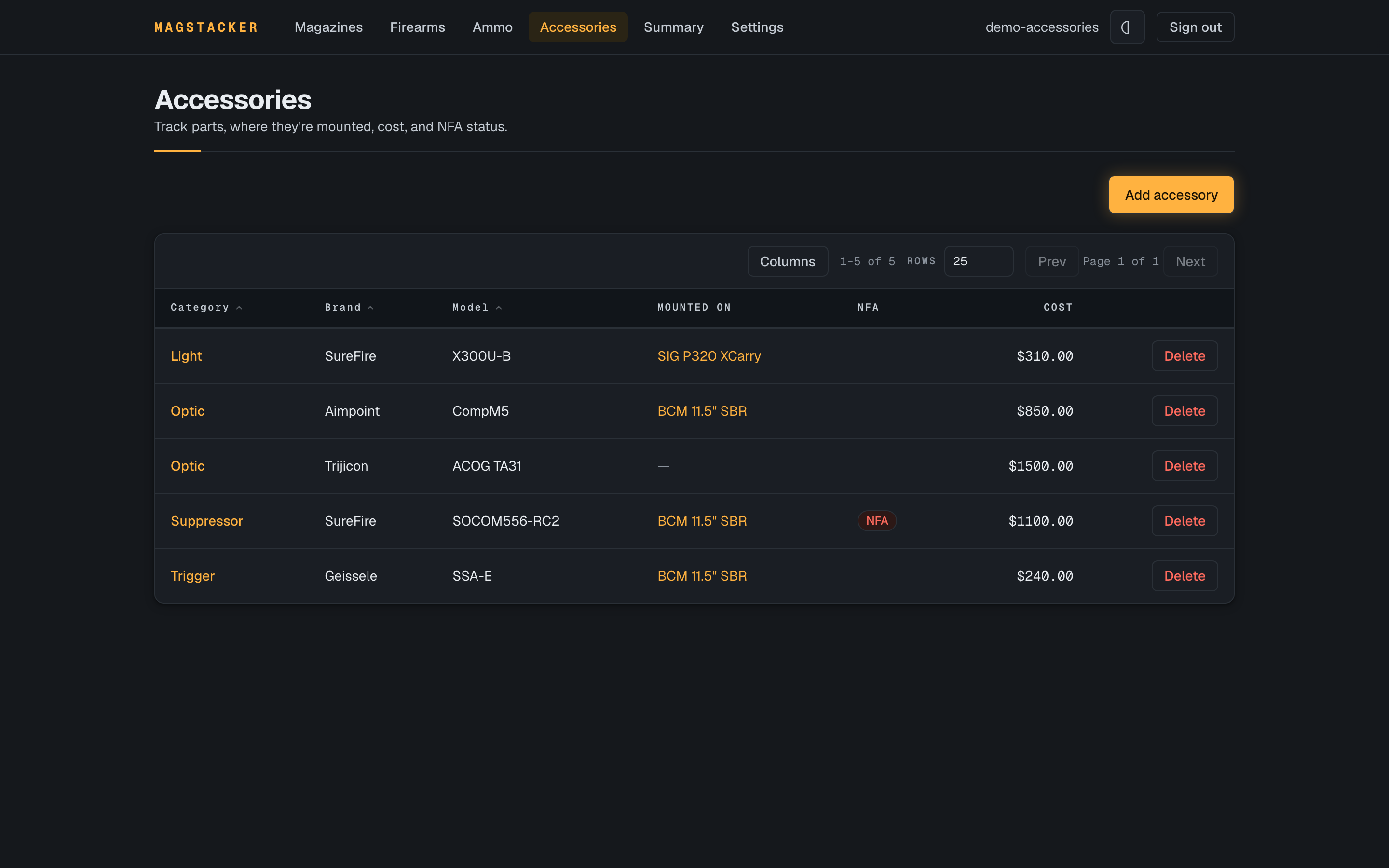
Aftermarket parts (optics, suppressors, triggers, lights) can be tracked independently with their own serial numbers, costs, NFA status, and mounting hardware. Track which firearms each accessory fits, share accessories independently, and each firearm’s page shows the total value mounted on it:
| Accessories | On a firearm |
|---|---|
 |
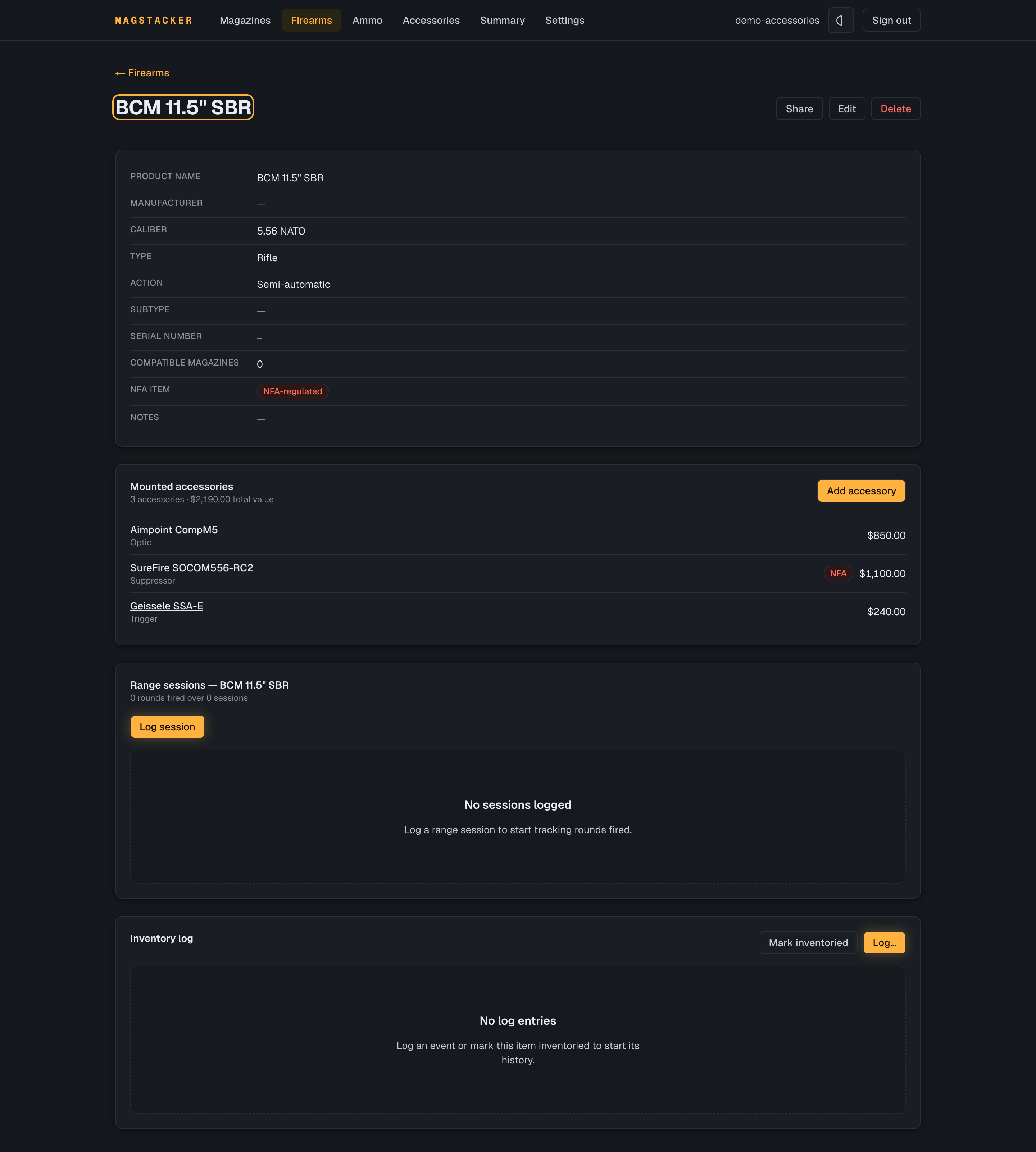 |
Who it’s for
- Individuals keeping a personal collection straight. Label your mags, see how many you’ve got per caliber and per firearm, and pull a copy for insurance or your own records.
- Clubs that want to share certain club-owned items (firearms, magazines, accessories) with members, read-only or editable, without opening up the whole inventory.
- Ranges handing fleet hardware to staff. Share an item at edit and switch on “allow adding records owned by me”, and an employee can add new range assets to the range’s books. A view-only volunteer can look but not touch.
Everyone sees only what they own or what’s been shared with them. Firearms, magazines, and accessories can be shared independently. Only an item’s owner can delete it. Revoke a share and it’s gone on the other person’s next request.
What you can do
- Add firearms and magazines with caliber, capacity (base plus any extension), labels, acquired date, serial, and notes.
- Link each magazine to the firearms it fits. The order you set is the order it shows up in everywhere else.
- Bulk-add a labeled batch in one go (say, 60 mags numbered
AR-01throughAR-60), and the count picks up where it left off the next time you add. - Filter magazines by brand or model, exact caliber, or which firearm they fit.
- Track ammo lots by caliber, load, and grain, with a low-stock threshold that flags when you’re running short.
- Track the accessories on each firearm (optics, suppressors, triggers, grips) with cost, serial, installed date, and NFA status. Move a part between guns and it keeps its identity, and a firearm’s page rolls up the total value mounted on it. Suppressors and other NFA items are flagged, and their serials stay sensitive.
- Track accessories (suppressors, optics, lights, etc.) independently with their own serial numbers, costs, NFA status, and mounting hardware. Record which firearms each accessory fits and share accessories on their own, even while unmounted.
- Check a summary: a running total, plus counts per caliber and per firearm, over everything you can see.
- Export to CSV for a spreadsheet. Serial numbers stay out of the export, and a cell that starts with
=won’t turn into a live formula when someone opens the file. - Share one item with another account at view or edit, optionally let them add records on your behalf, and take the access back whenever you want.
There’s no public sign-up. Accounts are created by whoever runs the server, and serial numbers are treated as sensitive everywhere they show up.
Quick start
You don’t need to clone the repo for this. Grab the two files the stack needs and start it with the published image, on any machine with Docker:
# 1. Grab the compose file and an env template (no checkout required)
curl -O https://raw.githubusercontent.com/unclesp1d3r/mag_stacker/main/docker-compose.yml
curl -o .env https://raw.githubusercontent.com/unclesp1d3r/mag_stacker/main/.env.example

# 2. Fill in .env: your first admin email and password, and BETTER_AUTH_URL
#    set to the address you'll actually open it at.

# 3. Create the two Docker secret files (R16) — the database password and the
#    Better Auth signing secret are NOT set in .env. Restrict them to
#    owner-only permissions as you create them:
mkdir -p secrets
(umask 077 && openssl rand -hex 24 > secrets/postgres_password.txt)
(umask 077 && openssl rand -hex 32 > secrets/better_auth_secret.txt)

# 4. Pull the published image and start the stack
docker compose pull
docker compose up -d          # migrates, seeds your first admin, starts the app
Once the stack is up, open http://<your-server>:3000/login and sign in as the admin you set in .env. Compose defaults to the latest released image; pin a specific version by setting MAGSTACKER_VERSION in .env (or use edge to track main). When you pin an older version, fetch docker-compose.yml and .env.example from that release tag too (swap main for the tag in the URLs above), since the compose file and env template evolve alongside the image and can drift apart from a pinned release.
On anything other than localhost, run it behind a TLS-terminating reverse proxy and set BETTER_AUTH_URL to the https:// address; see docs/deployment.md.
Running from a checkout
To build the image yourself instead of pulling the published one, clone the repo on a machine with Docker. A home server or the club’s back-office PC is plenty.
cp .env.example .env
# Fill in .env: your first admin email and password, and BETTER_AUTH_URL set
# to the address you'll actually open it at.

# Create the two Docker secret files (R16) — the database password and the
# Better Auth signing secret are NOT set in .env. Restrict them to
# owner-only permissions as you create them:
mkdir -p secrets
(umask 077 && openssl rand -hex 24 > secrets/postgres_password.txt)
(umask 077 && openssl rand -hex 32 > secrets/better_auth_secret.txt)

docker compose up --build -d                  # migrates, seeds your first admin, starts the app
The bootstrap runs migrations and creates your first admin account (from the ADMIN_EMAIL / ADMIN_PASSWORD you set in .env) before the app starts; docker compose logs migrate shows Created admin account for <email>. It’s idempotent, so re-running up never duplicates the admin.
Open http://<your-server>:3000/login, sign in, and add the rest of the accounts (staff, members, family) from the Accounts screen.
Run it behind HTTPS. Logins depend on cookies, so put MagStacker behind a reverse proxy that handles TLS (Caddy, nginx, Traefik) and set
BETTER_AUTH_URLto thehttps://address. There’s more indocs/deployment.md.
Backups
A pg_dump covers the database — every firearm, magazine, accessory, compatibility link, and share exactly as they were:
docker compose exec db pg_dump -U "$POSTGRES_USER" -Fc -d "$POSTGRES_DB" > magstacker.dump
It does not include uploaded documents (receipts, warranties, ATF forms) — those blobs live on the separate magstacker-uploads volume, not in Postgres, so a Postgres-only restore would come back missing every attachment. To back up both together, use the password-encrypted export on the Admin → Backup screen, or take a separate backup of the uploads volume alongside your pg_dump.
For running the Postgres and upload volumes on an encrypted host disk — and
a rundown of which threats disk encryption covers versus which an encrypted
in-app backup covers — see
docs/operations/encryption-at-rest.md.
Behind a reverse proxy
Sign-in rides on cookies, so on any real network you run MagStacker behind a reverse proxy that terminates TLS rather than exposing port 3000 directly. Point the proxy at the app’s published port and set BETTER_AUTH_URL in .env to the public https:// address. It must match the origin you actually open, or Better Auth rejects the request.
The smallest example is Caddy, which gets you an automatic Let’s Encrypt certificate. A whole Caddyfile can be two lines:
magstacker.example.com {
    reverse_proxy localhost:3000
}
Then set BETTER_AUTH_URL=https://magstacker.example.com in .env and restart the stack. nginx and Traefik work the same way: terminate TLS, proxy to the app port, and forward a single trusted client-IP header (e.g. X-Real-IP) so the auth rate limiting keys on the real client. Full details, including the header and port notes, are in docs/deployment.md.
For developers
MagStacker is the original Go/Wails (later Avalonia) desktop app rebuilt as a multi-user web app. It has to match what the desktop version already did, so the inventory rules are pinned to a parity spec and tested against it.
Stack: Next.js 16 (App Router), React 19, Bun, Drizzle ORM, Postgres, Better Auth, Tailwind v4, Biome. Use Bun and Biome, not ESLint/Prettier/pnpm (see AGENTS.md).
mkdir -p secrets                                          # once, if not already created
[ -f secrets/postgres_password.txt ] || (umask 077 && openssl rand -hex 24 > secrets/postgres_password.txt)  # (see secrets/README.md)
docker compose up -d db        # local Postgres on host port 5544
export DATABASE_URL="postgres://magstacker:$(cat secrets/postgres_password.txt)@localhost:5544/magstacker"
bun install
bun run db:migrate
bun run dev                    # http://localhost:3000

bun run lint                   # biome check
bun run format                 # biome format --write
bun run typecheck              # tsc --noEmit
bun test                       # unit + integration
mise(mise.toml) pins the toolchain and loads.envinto your shell, then caches it. After you edit.env, runmise cache clear, or a stale value can shadow both your tooling anddocker compose.The db service reads its password from
secrets/postgres_password.txt(a Docker secret, R16), not from.env— seesecrets/README.md.
The README’s demo images and walkthrough gif are generated from the live UI. Regenerate them all before a release with just demo-images (needs Docker + ffmpeg). The generators are e2e/demo-*.spec.ts, gated behind DEMO=1 so they stay out of the normal test run, and they share one sample dataset from e2e/fixtures/demo-seed.ts.
Layout:
app/                 # Next.js routes: login, gated inventory, admin, auth + export APIs
proxy.ts · auth.ts   # auth gate and Better Auth config
components/ui/        # design-system primitives
src/
  db/                # Drizzle schema, client, migrations, idempotency, health
  auth/              # the one server-side scoping/authorization layer
  domain/            # firearms, magazines, summary, csv, bulkadd, reference,
                     #   validation - plain TypeScript, no Next.js imports
  data/              # curated caliber/manufacturer lists
docs/                # deployment guide, architecture decision records, images
Authorization is enforced server-side in src/auth, and reads are viewer-relative: anything you can’t see drops out of lists, the summary, and exports before it reaches you. The parity behaviors are pinned to exact values in the test suite, including two-user tests that try to break the sharing rules.
License
MagStacker is licensed under the Apache License 2.0.
Contributing
Bug reports, feature requests, and pull requests are welcome. See CONTRIBUTING.md for the dev loop, the just ci-check gate, and PR guidelines.